Every story in Quintype has a structure. There are mandatory and non-mandatory components to a story. Your administrator can decide what elements are mandatory or non-mandatory.
Each story must have a Title, Subtitle, Hero image anda Card. For certain story types, the list of mandatory elements may be longer. For example - a Listicle story may mandatorily require at least three list items, apart from the Title, Subtitle, Hero image and an Introduction.
Story Elements
Elements are the building blocks of a story. You can add an element above, below, or in between elements. You can delete an element and add review comments to each element. An element can be displayed differently to a reader, based on the website’s layout settings.
Each element provides a delete icon and a comment icon (Start a Conversation) on its top right corner.
Within a card you can add the following elements:
Also Read: Enables you to add links to other documents.
Answer: Enables you to add an answer against a question element.
Attachment Element: Enables you to attach PDFs and Microsoft Word document. The size of the file cannot be more than 3 MB.
Bigfact: Can be used to add a short piece of information or add a summary.
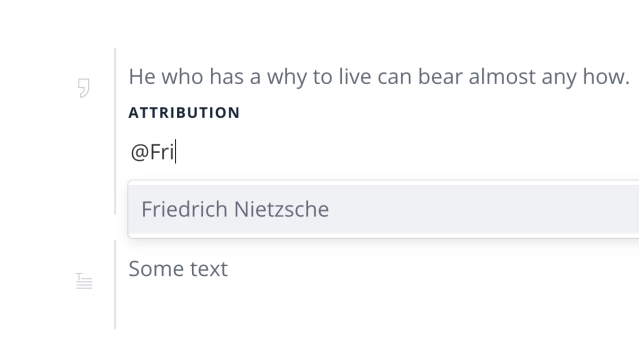
Blockquote: Can be used to enter quotation and attributed to an individual.
Blurb: Can be used to add a brief piece of information.
Image: Enables you to add an image
Image Gallery: Enables you to add multiple images, and display as a slide show or in a grid.
JS Embed: Enables you to embed a script tag. Enables you to add a link to Twitter, SoundCloud, Instagram, or YouTube posts.
Location: Enables you to search a location on a map and insert the map in the card.
Polltype: Enables you to add a poll with a title and description, the possible values, an image, and set the voting options such as anonymous or needs logging in and so on.
Q & A: Enables you to add a set questions and answers. The Question & the Answer elements of a Q & A story can be associated with different 'Person’ type entities.
Question: Enables you to add a question element.
Quote: Can be used to enter quotation and attributed to an individual.
References: Enables you to add reference links, with a name and description.
Summary: Can be used to add a summary. You cannot format the text.
Table: Enables you to add CSV files where information can be presented in a tabular format.
TextVideo (Bitgravity): Enables you embed to BitGravity player video.
Video (JwPlayer): Enables you embed to JW Player video.
Video (Vidible): Enables you embed to BitGravity player video.
The Responsive UI - Add Story Elements
Story elements can now be added with ease even on your mobile browsers.
Attribute Quotes and Block-quotes with images
Quotes and block-quote elements now allow attributing them to a person entity or an author, and can have images images displayed against the linked person as well.
Bold Release Note - 27 Aug
The embed element now supports Gumlet video URLs and recognises them as a valid video type for video stories.

The embed element now supports facebook reel URLs.

Rich Text image caption and attribution
The Caption and Attribution on images can now be of the rich text element.
Please get in touch with [email protected] to get this enabled for your account.
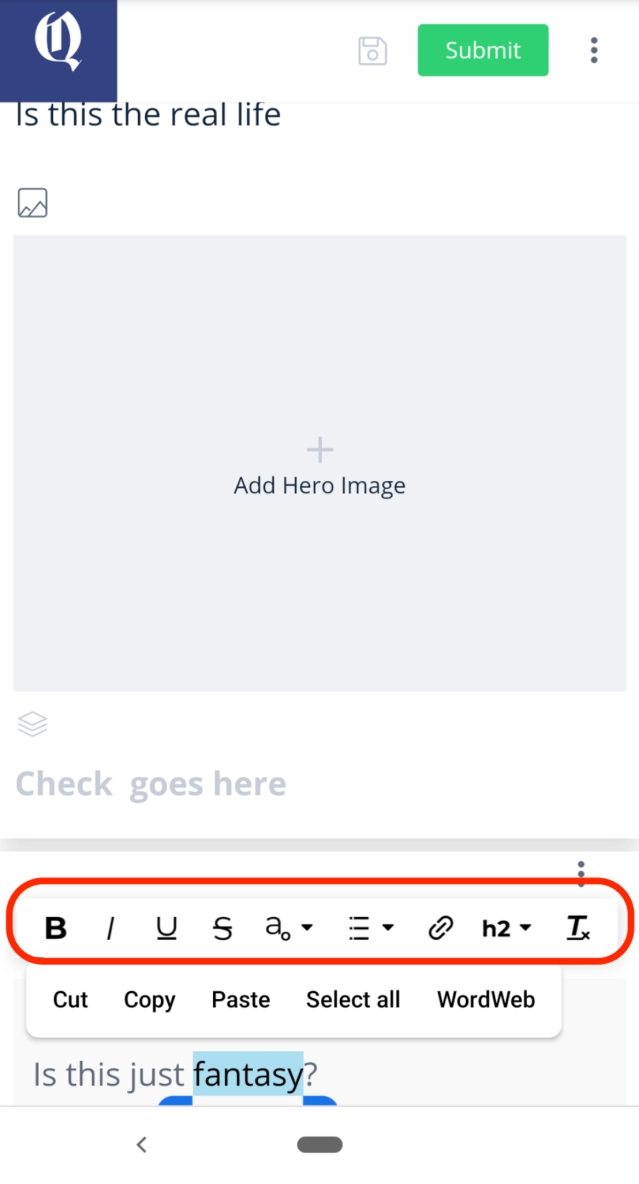
Text formatting now on your mobile browser
Format text in text elements using your mobile browser. Simply select text entered in Bold text elements, in your mobile browser to see various formatting options.