
You have 2 options to select the time format for the stories.
a. 12-hour
b. 24-hour
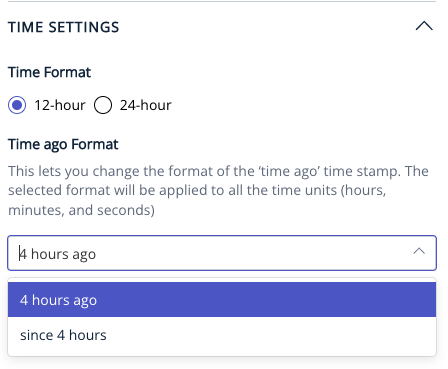
Also, you can choose the format of the time to “X minutes/hours ago” or “Since X minutes/hours”.
Enhancement: ‘Since’ Time Format Update - Specific to Arabic Publishers - changes for 1 | 2 minute(s) & 1 | 2 hour(s).
This is an update relevant to middle east publishers for Arabic language localization in the timestamp in the ‘most read’ widget.
Under this update,
since 2 seconds will become منذ ثانيتان
since 1 minute will become منذ دقيقة
since 1 hour will become منذ ساعة
since 2 minutes will become منذ دقيقتان
since 2 hours will become منذ ساعتان
How this works is if an 'exact' search text is found, it gets replaced with the replace text as provided:
replace text: search text
"منذ 2 ثواني": "منذ ثانيتان"
"منذ 1 دقيقة": "منذ دقيقة"
"منذ 2 دقائق": "منذ دقيقتان"
"منذ 1 ساعة": "منذ ساعة"
"منذ 2 ساعات": "منذ ساعتان"
For this to work, make the following changes:
1. Select 'Since 4 hours' in Pagebuilder by going to Settings ⇒ General Settings ==> Manage ==> Time Settings
2. Custom Labels should be enabled from Settings ⇒ General Settings ⇒ Custom Labels & below labels should contain localized words specifically as provided in above quote of 'search text'. “Since”, “Seconds”, “minute”,” minutes”, “hour”, and “hours”.
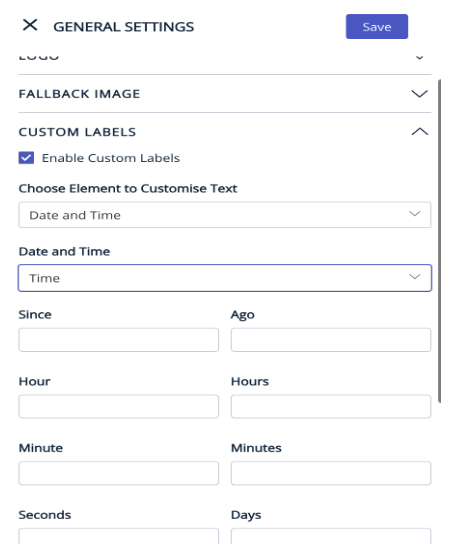
This change will be applicable to:
All available 24 layouts, Related Stories (side & bottom) ,Search Page,Tag Page and Author Page.
Enhancement: Published/Updated time on Liveblog
Scenario 1:
As a publisher, I should be able to choose which DateTime i.e. Published Time or Updated Time, can I display on the different pages - Home, Section, Tag, Author, Author Listing, Search, Story (related stories)
Scenario 2:
As a publisher, I should be able to choose which DateTime can I display for Live Blogs on the different pages.
Home, Section, Tag, Author, Author Listing, Search, Story (related stories)
1. Settings → General Settings → Manage → Time Settings → Placed between Time ago Format and Structured data time zone
2. Default logic in PB will remain as is i.e. Published Time will be displayed everywhere
3. To show Updated Time, the publisher will have to select the same from the global settings
4. In particular for Live Blogs, we advise the publishers to use Updated Time (disclaimer will be present)
Feature: Handle Published and Updated time across the website
As of today, PB provides the option on Story Pages to choose which dateTime publishers would like to display - Published On or Updated On, or Both.
With the change brought in for the logic of “Published On”, the reader experience for a story displaying only the “Updated On” on the story page and always the “Published On” on other pages has not been well received.
Outcome expected:
The change in PB is to provide the publisher the flexibility to choose whichever dateTime they would like to display across the website to maintain consistency and keep the reader experience seamless.